
Automating financial сonsulting for a Puerto Rico tax firm

From legacy code to an AI platform for US government reports
Puerto Rico is often unofficially referred to as the 51st US state. While the territory falls entirely under American economic jurisdiction, its corporate tax structure is radically different. While the mainland US federal corporate tax rate is a flat 21%, Puerto Rico operates under the special Act 60, which reduces the rate to 4% for eligible businesses.
Additionally, the local government incentivizes innovation through the R&D Tax Credit program, offering businesses a tax credit of up to 50% of their qualifying research and development investments made during the taxable year.
Our client is DECA – an analytics, advisory and tax firm operating in the B2B segment with enterprise clients and in B2C with private entrepreneurs. They help American corporations to conduct financial and accounting audits of expenses on the island, and issue official certificates used by the government to disburse grants.

16 days faster, 50% more capacity
The team went from emergency bug fixes in September to a full beta release in January. During beta, the platform ran with 10 clients and around 230 sessions per month. The headline business result: the full document processing cycle dropped from 51 to 35 days. Alongside it, we tracked two kinds of UX results: behavior analytics from real beta sessions, and moderated usability tests of the redesigned admin flows.
From beta session analytics:
- Less frustration: frustration signals dropped by 10% after small fixes such as the copy-field button.
- Fewer wrong turns: the backtracking rate, when users return to a previous step out of confusion, fell from 16% to 5–6%.
- Faster pages: the average time to work through a page was cut from nearly two minutes to about one.
From moderated usability testing of the redesigned flows:
- 80% task success in the new prospect onboarding flow.
- 25% less time for admins to decide on the next step.
- +30% interaction with key management features on the Organizations page.


From fragmentation to a single platform
The client approached our team with a critical issue. A previous agency had developed an internal system for them that was unstable, riddled with bugs (legacy code), and effectively paralyzing the company's operations. Underneath the bugs, three problems were capping the firm's growth:
- Prospects were slipping away. Emails landed in spam, managers couldn't see NDA or questionnaire status, and client history was split across Monday.com, Google Drive, and inboxes.
- Admins were the bottleneck. A clunky interface slowed every routine task.
- Audit math lived in a spreadsheet. The CFO's Excel model kept falling out of sync.
Our vision
Developing enterprise-level software for financial consulting goes beyond merely writing code. It is a complete business transformation. We firmly believe that to successfully implement such solutions, a team must possess hybrid expertise, blending technical skills with a deep understanding of financial formulas and the legal space.
"You aren't just building a system where people 'push buttons.' You need to understand how these formulas work and how the government submission process happens. You operate in two dimensions: the software dimension and the legal dimension, working alongside the client’s COO to identify gaps in their processes and bridge them with IT solutions," notes the project's Team Lead.
The same applies to the interface. An admin who processes dozens of prospects a week will not read instructions. If the next action is not obvious, the delay lands directly on the client's processing time. That is why we treated UX as part of the operational work, not as a visual layer on top of it.
Ecosystem and architecture overview
To avoid disrupting the client's business, we adopted a two-phase approach. First, we conducted emergency "firefighting" to fix critical bugs, and later, we completely rewrote the platform from scratch, eliminating the outdated structure.
By leveraging AI (specifically Claude) to write code, development speed increased exponentially. Tasks that previously took months were completed by three developers in a single two-week sprint.
The rebuild was functionality-first: the priority was to get a stable, working system into the team's hands fast. As new modules were added, the interface had to catch up with them. Closing that gap became the focus of our UX work.
Overcoming chaos in client acquisition
The immediate priority was to unify fragmented communications during the presale stage.
Prior to the platform's implementation, the client was losing potential leads due to the lack of a single control point. Emails ended up in spam, managers were unaware of document signing statuses, and interaction histories were scattered across Monday.com and email.
The team developed a prospects module (one-way lead generation). Now, managers have a unified dashboard displaying every step of the client's journey (e.g., whether an NDA is signed or a questionnaire is completed).
Internal integration with Gmail allows staff to conduct correspondence directly from the client's card in the CRM – ensuring every employee can view the entire communication history.
UX research and redesign
Research-led redesign of the admin panel
Analytics showed where admins struggled, but not why. Our designer started by going through every flow as a first-time user, which surfaced a long list of issues the team had stopped noticing. Then we ran moderated usability tests with DECA's admins: real tasks in a clickable prototype, no guidance, participants thinking aloud. We grouped the findings with affinity mapping, turned them into design hypotheses, and retested each fix before handing it to development.
Prospect onboarding: five phases, one clear next step
Every new client goes through five onboarding phases, with the admin and the prospect taking turns. Testing showed that admins couldn't tell which phase was active, and key buttons like Send MNDA and Send to Review sat far from where they worked, with no sign of which one mattered.
We gave each phase its own block, highlighted the active one, added a status to every phase, and moved all actions inside the blocks.
Testing results: 80% task success, 25% less time deciding on the next step, and 15% fewer frustration signals on the step that caused the most trouble. We project up to 20% less time to complete all five phases. For DECA, that means new clients start their applications sooner instead of waiting on the admin side.
Organizations page: from static list to daily hub
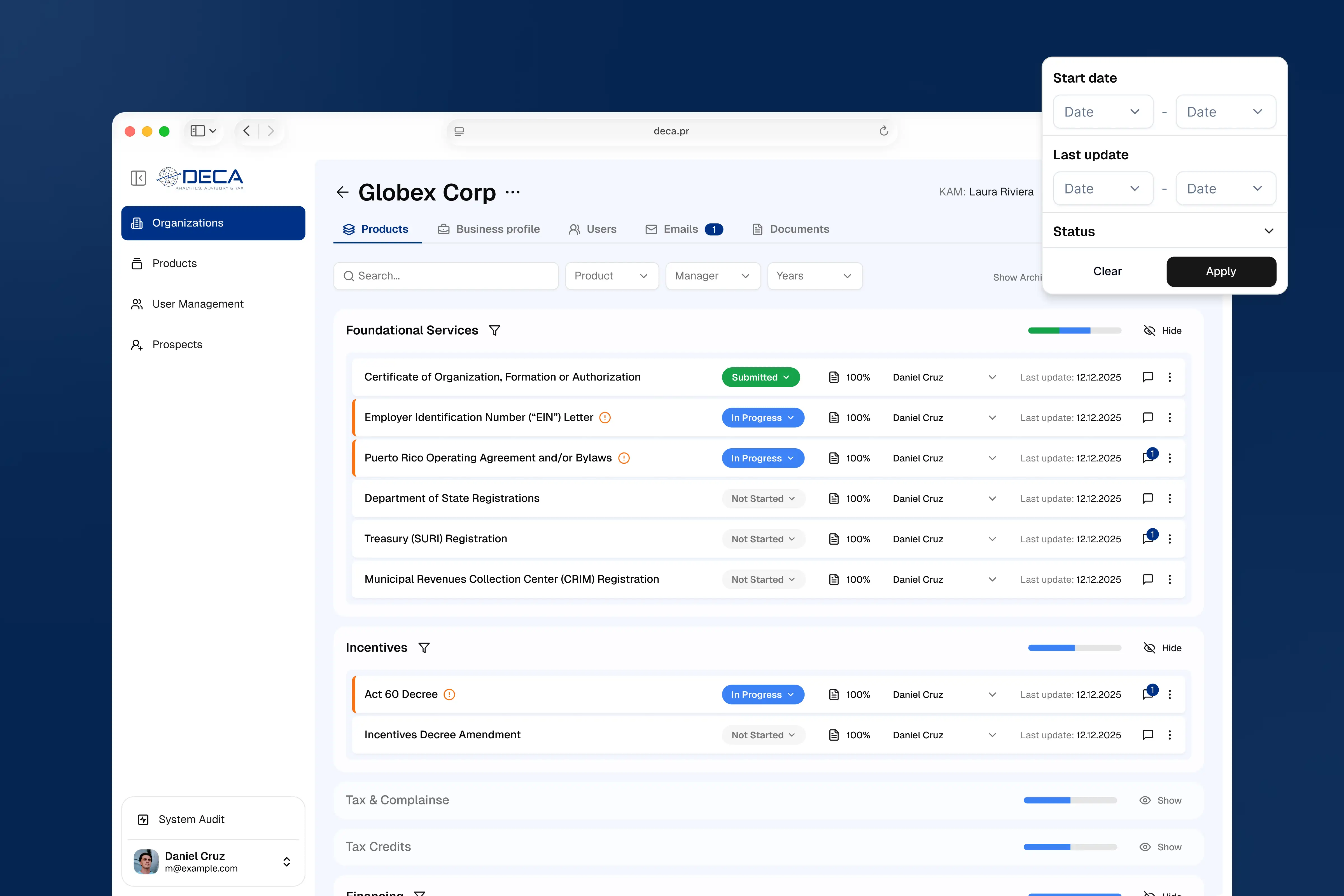
The page listing an admin's organizations was read-only. Even the services listed under each organization weren't clickable, so admins had to open each organization for basic tasks and gradually stopped using the page.
We added quick actions and filters, turned each service into a clickable card, and added a productivity sidebar with the admin's tasks, meetings, and Google Meet scheduling.
Testing result: +30% interaction with key management features. We project up to 25% faster completion of key admin tasks. Time admins used to spend hunting for actions now goes into processing applications.
Financial processes transformation
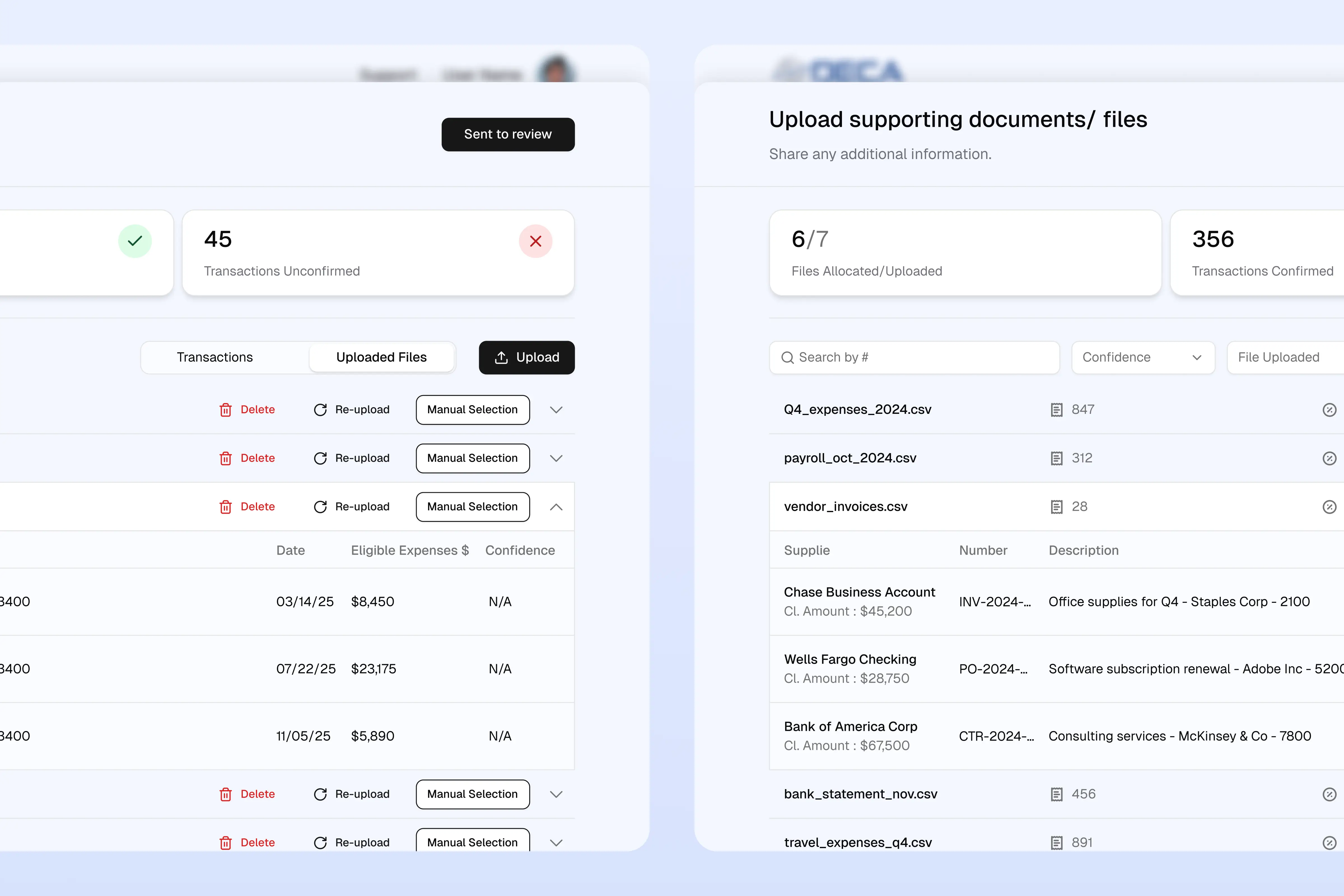
The workflows of the administrators and the Chief Financial Officer (CFO) were bogged down by routine tasks. The CFO performed highly complex audit calculations in a massive Excel file that was prone to desynchronization.
Meanwhile, administrators struggled with a clunky interface, wasting time on "dead clicks" and constantly switching between accounts.
Solution examples:
- We transformed complex Excel spreadsheets into a secure web interface within the organization's card. Now, changing a single digit automatically updates the data everywhere.
- Analytics (Hotjar, Clarity) revealed that admins were constantly highlighting text with their mice to copy it, generating dead clicks. Adding a simple "copy field" button instantly resolved this issue.
- We added a direct redirect button that allows a manager to instantly view a form through the client's eyes to provide immediate support.
- We also relied on an informal feedback loop: a trusted person on the client's side gathered information in casual conversations, which highlighted real employee pain points.
Design workflow
Prototyping in Claude Code instead of static mockups
A new feature used to take about three days in Figma: rebuilding screens, linking a static prototype, testing, revising, and preparing the handoff. Now the designer builds a working prototype in Claude Code, tests it with the client, and only then moves the approved version to Figma and Jira. The same cycle takes about one day.
Global Search is one example. The designer prototyped it as part of a sidebar redesign, and a live session with DECA's project manager confirmed the need before any development time was spent. For DECA, this means trying a feature as if it were live and dropping it if it doesn't fit, at the cost of hours rather than a sprint.
"AI speeds up the work, but it doesn't understand your end users or tell good from bad. The designer still has to find the real problem and decide why a solution should work this way," says the project's Product Designer.


From 51 to 35 days
The platform cut the full document processing cycle from 51 to 35 days. For DECA's clients, certificates now arrive 16 days sooner, and with them the grants and tax credits they unlock.
Automation and a structured follow-up system cut the routine work. The redesigned admin flows cut the hesitation between steps. Together, they give the client capacity to process nearly 50% more applications.
This project proved that true digitalization is impossible without a deep understanding of business logic, and of the people who run it every day.
Ultimately, DECA is receiving more than just a CRM. They are gaining a tool for scaling their operations, built and tested with the admins who use it.

.avif)

.webp)
.webp)